Kodi doesn’t come with any TV channels. To watch IPTV in it, you have to connect your own playlist through one official add-on. Most guides skip the settings that matter and still describe old menus. This guide walks through the full Kodi IPTV setup for Kodi 21 “Omega” on Firestick, Android TV, Windows and Mac.
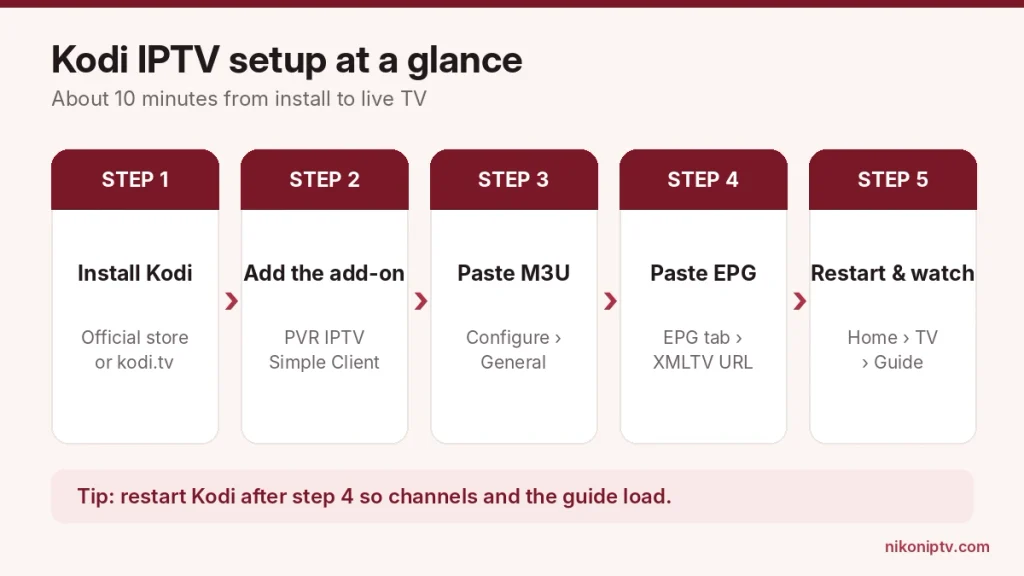
To set up IPTV on Kodi, install the free PVR IPTV Simple Client from Settings › Add-ons › Install from repository › PVR clients. Open Configure, set Location to Remote path and paste your M3U playlist URL. Add your XMLTV link under EPG, restart Kodi and open TV from the home screen.
The full Kodi IPTV setup takes about 10 minutes.
Key Takeaways
The only add-on you need is PVR IPTV Simple Client. It is free and comes from Kodi’s own official repository.
Kodi 21.3 “Omega” is the current stable version. Kodi 22 “Piers” is still a release candidate (RC 1, October 10, 2026).
If your provider gave you an Xtream Codes login instead of a link, you can turn it into an M3U URL and an EPG URL in one minute (shown below).
Amazon’s newest Fire TV Sticks run Vega OS and can’t install Kodi at all. That includes the new Fire TV Stick 4K released on September 30, 2026. Check your model before you start.
What You Need Before You Start
You need three things: a device that runs Kodi, the Kodi app itself and a playlist from your IPTV provider.
A supported device. Kodi runs on Android and Android TV, Fire TV (Fire OS models only), Windows, macOS, Linux, iPhone, iPad, Apple TV and Raspberry Pi. Kodi’s official download page lists every platform.
Your playlist details. Either an M3U URL (a link that ends in something like get.php?... or .m3u) or an Xtream Codes login (server URL, username and password). If you are not sure what an M3U file is, read our simple guide to M3U playlists first.
An EPG link (optional but useful). This is the TV guide that shows what is on now and next. Most providers give an XMLTV link for it. Here is what an EPG is and why it matters.
One quick legal note: Kodi itself is free and legal. It is only a player. The content you load into it must come from a licensed service. Our list of legal IPTV services can help you check.
Careful: “Kodi IPTV Player” Apps Are Not Kodi
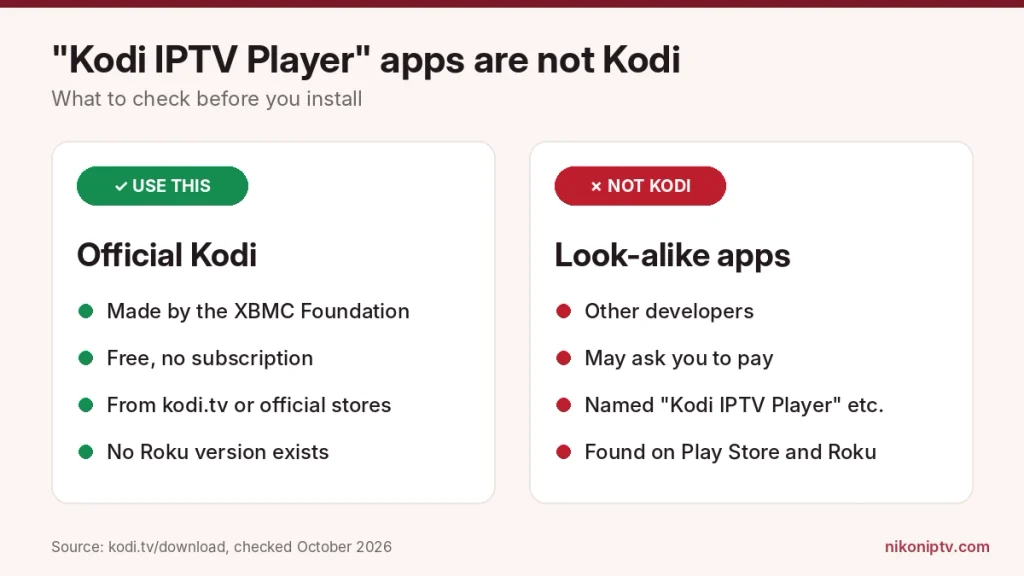
If you search the Play Store or the Roku Channel Store for “Kodi IPTV”, you’ll see apps called things like “Kodi IPTV Player”. They are separate apps from other developers. They are not made by the Kodi team.
The real Kodi is published by the XBMC Foundation and is free on the official Kodi download page. Kodi doesn’t offer a Roku version at all, so any “Kodi” app on Roku is a different product. If an app asks you to pay for “Kodi”, it isn’t the official one.
Apps named “Kodi IPTV Player” come from other developers. The real Kodi is free.
Inside the real Kodi, you may also see an add-on called IPTV Manager. It is official too, but it does a different job: it pulls channels from other Kodi add-ons into the TV menu. For a normal M3U playlist from your provider, PVR IPTV Simple Client is the one you want.
Which Devices Can Run Kodi for IPTV?
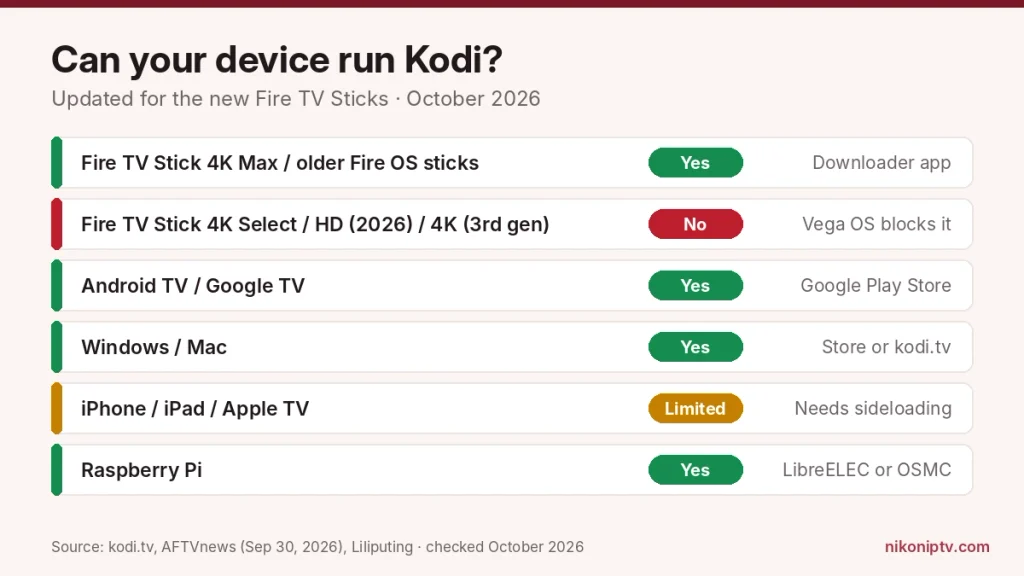
Almost every streaming device can run Kodi. The big exception is Amazon’s newest Fire TV Sticks. The Fire TV Stick 4K Select (2025), the Fire TV HD (2026) and the new Fire TV Stick 4K (3rd gen, September 30, 2026) all run Vega OS instead of Android-based Fire OS. Vega OS can’t install apps from outside the Appstore, so Kodi will not work on them. As of October 2026, the Fire TV Stick 4K Max is the last Fire TV Stick that runs Fire OS.
The Fire TV Stick 4K Select, Fire TV HD (2026) and new Fire TV Stick 4K can’t install Kodi.
Device
Can it run Kodi?
How to install
Fire TV Stick 4K Max and older Fire OS sticks
Yes
Downloader app (Kodi is not in the Amazon Appstore)
Fire TV Stick 4K Select (2025)
No
Vega OS blocks sideloading
Fire TV HD (2026)
No
Vega OS blocks sideloading
Fire TV Stick 4K (3rd gen, Sept 2026)
No
Vega OS blocks sideloading
Android TV / Google TV
Yes
Google Play Store
Windows 10 / 11
Yes
Microsoft Store or kodi.tv
Mac
Yes
kodi.tv download
iPhone / iPad / Apple TV
Yes, with limits
Needs sideloading (not in the App Store)
Raspberry Pi
Yes
LibreELEC or OSMC
Source: Kodi download page and Kodi Wiki, verified October 2026; Vega OS models reported by AFTVnews (September 30, 2026) and Liliputing (April 17, 2026).
Not sure which Fire TV you have? Go to Settings › My Fire TV › About. If you see “Fire OS” with a version number, you are fine.
Step 1: Install Kodi on Your Device
Download Kodi only from the official site or your device’s official store. Copies from other sites can come bundled with unwanted add-ons.
On Android TV, Google TV or Windows: open the Play Store or Microsoft Store, search for “Kodi” and install the app by the XBMC Foundation.
On a Firestick (Fire OS):
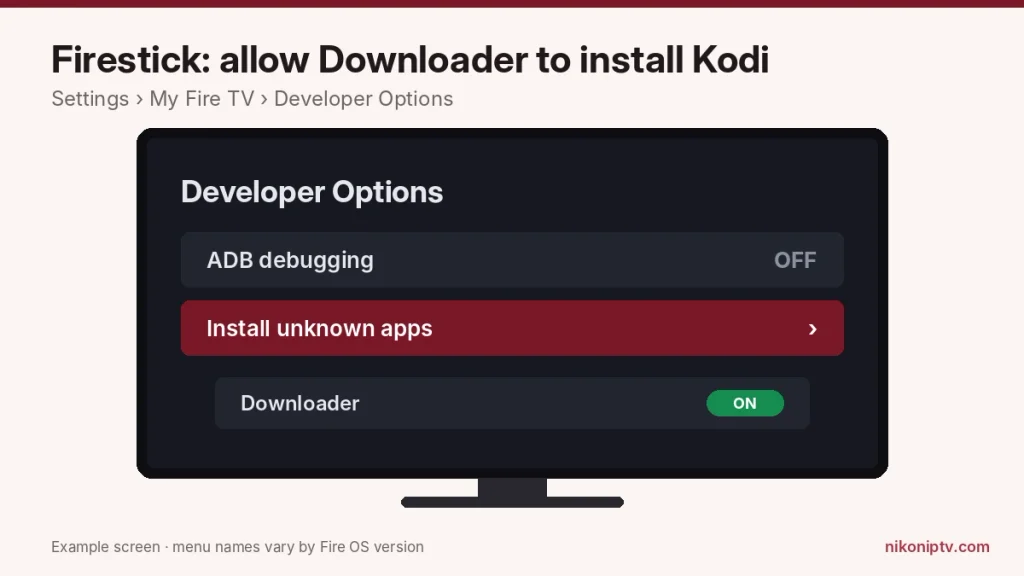
Go to Settings › My Fire TV › About and click your device name 7 times. This unlocks Developer Options.
Go back to My Fire TV › Developer Options and turn on Install unknown apps for the Downloader app (on older models the switch is called Apps from Unknown Sources).
Install the free Downloader app from the Amazon Appstore.
Open Downloader and enter kodi.tv/download. Choose Android and then the ARMV7A (32BIT) installer, which works on every Fire OS stick.
Install the file and open Kodi.
Example screen. Turn on Install unknown apps for Downloader only.
If you already use other IPTV apps on your stick, our guide to IPTV on Firestick covers the same Developer Options steps with more detail.
Step 2: Install PVR IPTV Simple Client
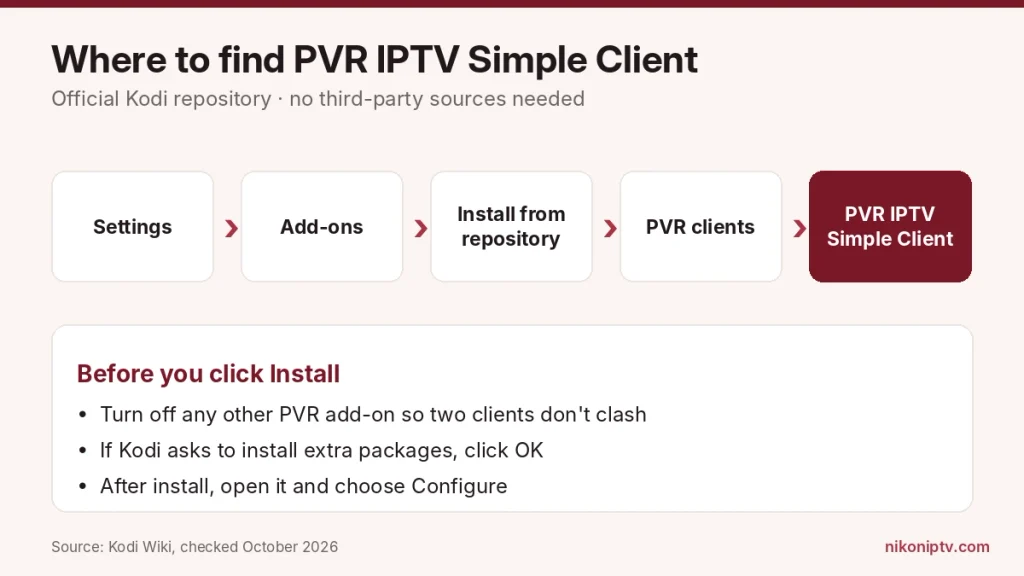
PVR IPTV Simple Client is the official add-on that lets Kodi read M3U playlists and XMLTV guides. You don’t need any third-party repository for it.
Open Kodi and click the gear icon (Settings).
Choose Add-ons.
Choose Install from repository.
Open PVR clients.
Select PVR IPTV Simple Client and click Install.
If Kodi asks to install extra packages, click OK.
Kodi’s own guide suggests turning off any other PVR add-on first, so two clients don’t fight over the TV section.
Settings › Add-ons › Install from repository › PVR clients.
Step 3: Add Your M3U Playlist
This is where most setups go wrong. The add-on has two ways to load a playlist. You must pick the one that matches what you have.
Go to Settings › Add-ons › My add-ons › PVR clients › PVR IPTV Simple Client.
Click Configure.
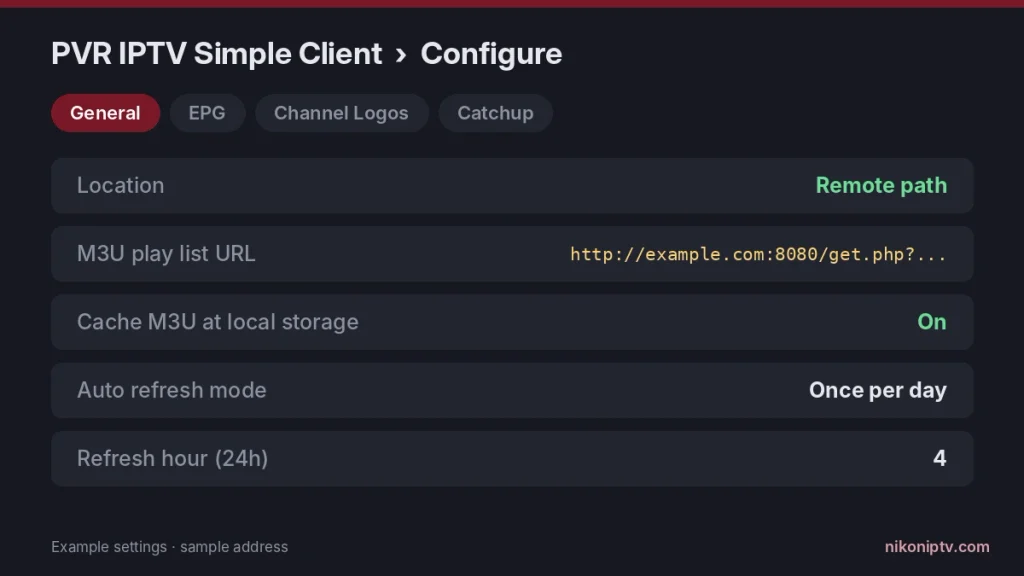
In the General tab, set Location:
Remote path if your provider gave you a link. Paste it into M3U play list URL.
Local path if you downloaded an .m3u file. Browse to it in M3U play list path.
Leave Cache M3U at local storage on. Kodi will then load channels faster next time.
Click OK.
Example settings with a sample address. Use Remote path for a link.
Should you turn on Auto refresh? If your provider changes channels often, set Auto refresh mode to Once per day and pick an hour when you don’t watch TV (for example, 4 in the morning). The other choice, Repeated refresh, can reload every few minutes (up to 120), which is more than most people need. Note that caching turns off while auto refresh is on.
Step 4: Add the TV Guide (EPG)
The EPG fills Kodi’s guide grid with show names and times. Without it, you only see a list of channels.
In the same Configure window, open the EPG tab.
Set Location to Remote path and paste your XMLTV link into XMLTV URL.
Click OK and restart Kodi.
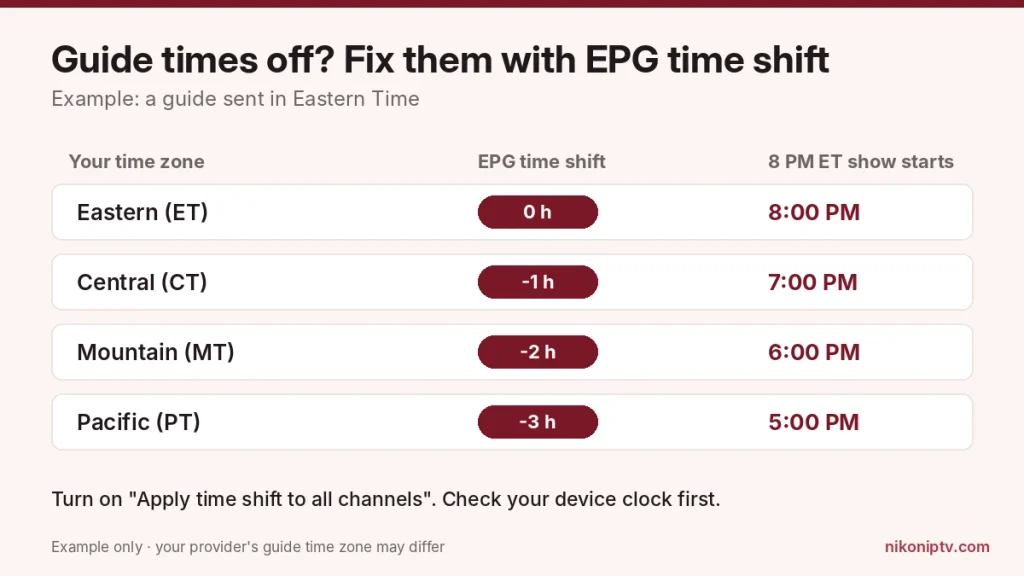
Fixing guide times in the US. Many guides are sent in one time zone. If every show looks 3 hours off on the West Coast, use EPG time shift (it goes from -12 to +14 hours) and turn on Apply time shift to all channels. Kodi uses your device’s clock too, so make sure the time zone on your TV or computer is right first.
Example for a guide sent in Eastern Time. Your provider may use another zone.
Kodi matches guide data to channels by the tvg-id tag in your playlist. If a channel shows “No information available,” that tag is missing or different in the guide file. Your provider can fix it on their side.
Step 5: Watch Live TV
After a restart, Kodi loads your channels and the guide. This can take a few minutes the first time on large playlists.
On the Kodi home screen, click TV.
Open Channels for the full list or Guide for the grid view.
Press OK on any channel to play it.
Want to record a show or watch it later? That depends on your provider’s server, not Kodi. Our guide to cloud DVR for IPTV explains how that works.
Only Have an Xtream Codes Login? Turn It Into Kodi Links
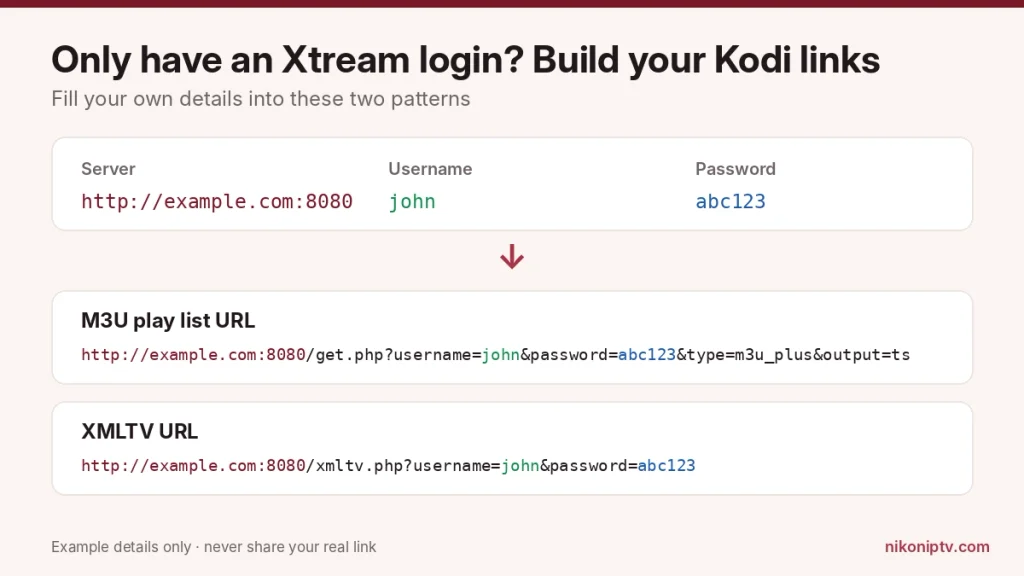
PVR IPTV Simple Client has no box for a username and password. It only reads links. The good news: almost every Xtream Codes panel creates those links for you. You only need to fill in your own details.
Each color shows where your server, username and password go. Example details only.
For example, if your server is http://example.com:8080, your username is john and your password is abc123, your M3U URL is http://example.com:8080/get.php?username=john&password=abc123&type=m3u_plus&output=ts.
Paste the first link into M3U play list URL and the second into XMLTV URL. If the playlist doesn’t load, ask your provider for their exact M3U link. Some panels use a different format.
Is your login itself rejected? That’s an account or address problem, not a Kodi problem. Our guide to the IPTV Smarters “failed to authorize” error shows a 60-second browser test that tells you if the account works.
Turn On Catch-Up (If Your Provider Supports It)
Catch-up lets you play shows that already aired from the guide. Kodi can do this only if your provider offers it.
Open Configure and go to the Catchup tab.
Turn on Enable catchup.
For Xtream Codes providers, set Channels support catchup using mode to Xtream codes.
Set Catchup window to the number of days your provider keeps (often 1 to 7).
If shows in the past still won’t play, your provider’s channels don’t support catch-up. No setting in Kodi can change that.
Add a Second Playlist
Since Kodi 20 “Nexus”, PVR IPTV Simple Client can hold more than one playlist at the same time. This helps if you have a backup provider or a separate list of local channels.
Open the add-on and click Configure.
Choose Add add-on configuration.
Give it a name and fill in the second M3U and EPG links the same way.
Common Kodi IPTV Problems and Fixes
Most Kodi IPTV problems come from a wrong link, an old cache or a mismatch between the playlist and the guide.
Problem
Most likely cause
Fix
“No channels” or an empty TV menu
Wrong M3U link or Location set to the wrong path
Check Remote vs Local path; open the link in a browser to see if it downloads
Channels load but the guide is empty
No XMLTV link or tvg-id mismatch
Add the XMLTV URL; ask the provider to match tvg-id
Guide times are hours off
Time zone difference
Use EPG time shift; check the device clock
New channels don’t appear
Cached old playlist
Turn on Auto refresh “Once per day” or clear data (see below)
Channels buffer or freeze
Slow internet or busy server
Test the same channel in another app; use a wired connection
“PVR manager is starting up” never ends
Very large playlist or two PVR add-ons on
Disable other PVR clients; wait the first time
Source: PVR IPTV Simple Client documentation (GitHub README) and Kodi Wiki, verified October 2026.
How to clear old channel data: go to Settings › PVR & Live TV › General and choose Clear data. Then restart Kodi so it loads your playlist fresh. Menu names can differ a little between Kodi versions.
If buffering is the main problem, the player might not be the issue. Our comparison of VLC vs Kodi for IPTV shows when a lighter player works better.
The Honest Downsides of Kodi for IPTV
Kodi is a great free player, but it is not perfect. Knowing its weak spots before you start saves time later. None of these are deal-breakers for most people.
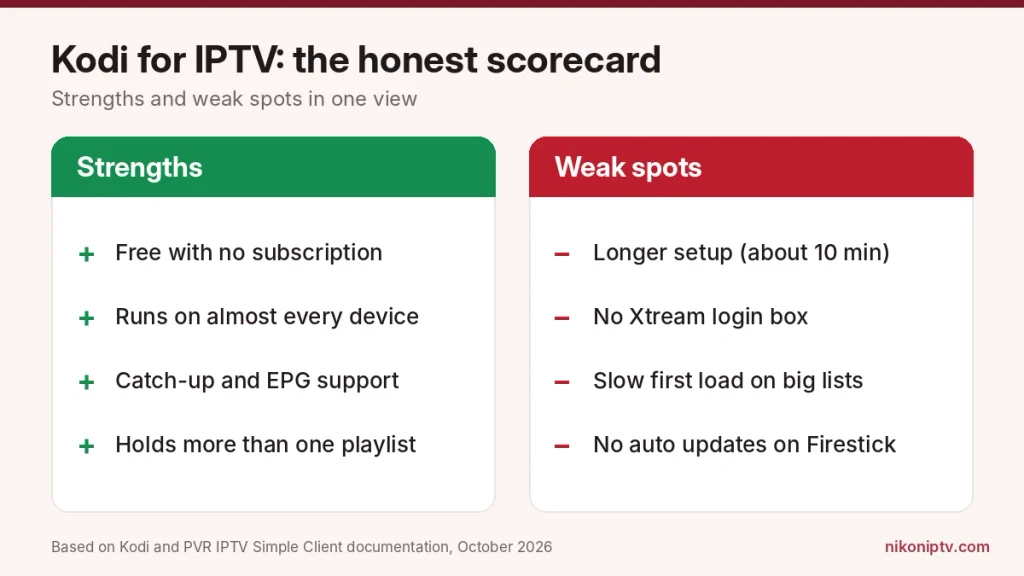
It takes longer to set up. A dedicated IPTV app asks for a login and you’re done. Kodi needs an add-on, two links and a restart. Plan for about 10 minutes the first time.
No login box for Xtream Codes. The official add-on only reads links. You have to build the M3U and EPG links yourself (the steps are above).
The first load of a big playlist is slow. With thousands of channels, Kodi can take a few minutes to build the channel list and guide the first time. After that, the cache makes it faster.
No automatic updates on a Firestick. Because Kodi isn’t in the Amazon Appstore, it won’t update by itself. You have to install new versions with Downloader when they come out.
Recording isn’t built into the add-on. PVR IPTV Simple Client plays live TV and catch-up. It doesn’t record shows on its own.
Third-party add-ons carry risk. The official add-on is safe. Unknown add-ons from outside repositories can break without warning or put your device at risk. Stick to the official one in this guide.
If any of these matter a lot to you, a simpler player may suit you better. That’s fine too. Kodi is one good option, not the only one.
Kodi is free and flexible. It takes a little more setup than simple apps.
Kodi vs Other IPTV Players
Kodi is the most flexible choice, but it takes more setup than a dedicated IPTV app. It is a good fit if you like to control every setting or already use Kodi for your own videos.
Choose Kodi if you want a free player that runs on almost any device, supports catch-up and lets you combine playlists.
Choose a simpler player if you just want to type a login and watch. You can see how IPTV works in VLC or on Plex for comparison.
Frequently Asked Questions
Can I use Kodi for IPTV?
Yes. Kodi plays IPTV through the official PVR IPTV Simple Client add-on. You add your provider’s M3U playlist link and an optional EPG link. Your channels then show up under TV on the home screen.
Is there a monthly fee for Kodi?
No. Kodi and PVR IPTV Simple Client are both free with no subscription. You only pay for the IPTV service itself. If you are still choosing one, our guide on how to choose an IPTV subscription explains what to look for.
Is it legal to use IPTV on Kodi in the US?
Kodi is legal software. Using it with a licensed IPTV service is legal. Streaming channels from a service that doesn’t hold the rights is not. The player doesn’t change that.
What is the best IPTV add-on for Kodi?
PVR IPTV Simple Client is the official choice and the one Kodi’s own team maintains. Third-party add-ons from unknown repositories can stop working without notice and may carry security risks.
Can I use an Xtream Codes login in Kodi?
Not directly in PVR IPTV Simple Client. Turn your login into an M3U URL and an XMLTV URL with the patterns shown above. Then paste those links into the add-on.
Does Kodi still work in 2026? Is Kodi shutting down?
Kodi still works and is not shutting down. The Kodi team released version 21.3 “Omega” in December 2025. They published the first release candidate of Kodi 22 “Piers” on October 10, 2026. You can follow updates on the official Kodi blog.
Is Amazon Firestick blocking Kodi?
Only on the newest models. The Fire TV Stick 4K Select, the Fire TV HD (2026) and the new Fire TV Stick 4K (3rd gen) run Vega OS, which can’t install apps from outside the Appstore. The Fire TV Stick 4K Max and other Fire OS devices can still install Kodi with the Downloader app.
Why did Kodi disappear from my Firestick?
Kodi isn’t in the Amazon Appstore, so it doesn’t come back by itself after a factory reset or a device swap. Install it again with Downloader. If you moved to a Vega OS stick such as the new Fire TV Stick 4K, Kodi can’t be installed on it.
Can I watch Netflix on Kodi?
There is no official Netflix add-on in Kodi’s own repository. Kodi is a player for your own media and services you already have. It doesn’t give free access to paid services like Netflix.
Final Thoughts
Kodi IPTV setup comes down to one free add-on and two links: your M3U playlist and your XMLTV guide. Get the Location setting right, add the guide and fix the time shift if needed. Most problems after that are on the playlist side, not in Kodi.
Which device are you running Kodi on? Tell us in the comments and we’ll help with any setting that doesn’t look the same on your screen.
James Walker is a global streaming consultant and IPTV reviewer with over 15 years of industry experience. He has advised OTT platforms, broadcasters, and IPTV providers on content delivery, monetization strategies, and user experience optimization. His deep understanding of streaming infrastructure allows him to evaluate services beyond surface-level marketing claims. James focuses on real metrics such as buffering rates, server reliability, and multi-device performance. Through his writing, he aims to bridge the gap between technical performance and user expectations—offering readers clear, trustworthy insights into the best streaming solutions available today.

One Response