You installed IPTV Extreme and your provider asked for a MAC address. Now you are not sure which one: the one on the app screen, the one in your TV settings or the 00:1A:79 one from the setup email. This guide shows where the IPTV Extreme MAC address is, how to link a playlist with it and how to fix the “Your STB is blocked” message.
The IPTV Extreme MAC address is an ID the app creates for linking your playlist through the IPTV Extreme Portal. Open the app, tap Add playlist, choose IPTV EXTREME PORTAL and note the MAC: field (format aa:bb:cc:11:22:33). Enter it at iptvextreme.eu with your playlist details, then restart the app.
Key Takeaways
- The IPTV Extreme MAC address appears in the app under Add playlist → IPTV EXTREME PORTAL.
- It is not your device’s hardware MAC. Android has blocked apps from reading the real Wi-Fi MAC since Android 6.0.
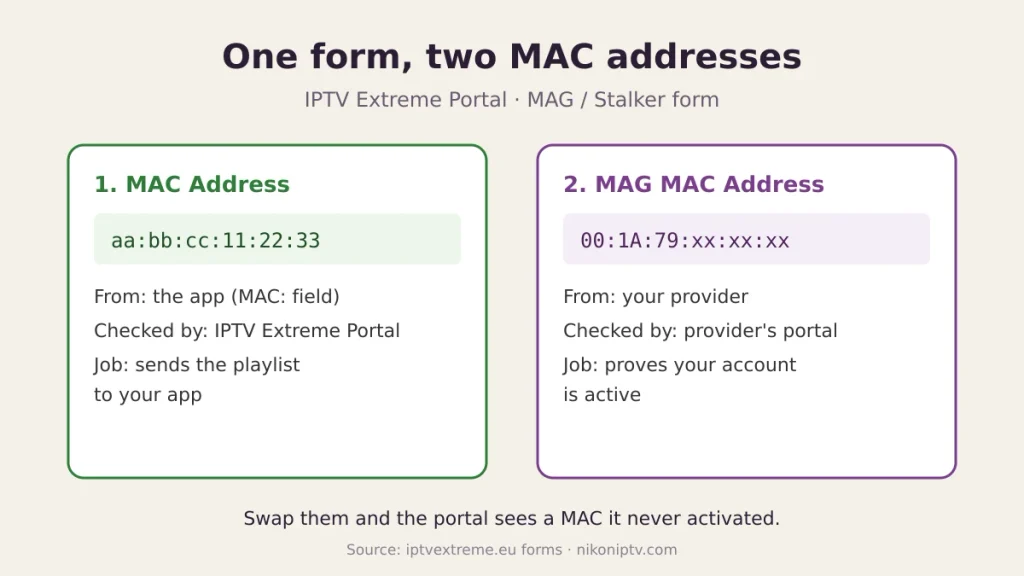
- The MAG/Stalker form on the portal has two MAC fields: the app’s MAC and a separate MAG MAC Address.
- “Your STB is blocked, call the provider” usually means an expired subscription or a MAC that is not activated.
What is the IPTV Extreme MAC address?
The IPTV Extreme MAC address is a device ID shown inside the app. The IPTV Extreme Portal uses it to know which installed app should receive the playlist you upload.
Think of it like a mailbox number. You post your playlist to the portal with that number. The app on your TV then collects it.
It looks like a normal network MAC address: six pairs of letters and numbers split by colons. That is why many people mix it up with the MAC in their TV’s network settings.
How to find your MAC address in IPTV Extreme
You find the IPTV Extreme MAC address in three taps. These steps follow an IPTV Extreme Pro support guide.
- Open IPTV Extreme (or IPTV Extreme Pro) on your Android device.
- Tap Add playlist. A menu of playlist types appears.
- Choose IPTV EXTREME PORTAL. A new screen opens.
- Find the MAC: field. Write down the address, which looks like aa:bb:cc:11:22:33.
Keep that screen open while you go to the portal. It is easy to mistype a 0 (zero) as an O, so double-check each pair.
How to add a playlist with the IPTV Extreme Portal
The IPTV Extreme Portal has three forms. Pick the one that matches the login details your provider sent you.
| Portal form | Use it when you have | Fields you fill in | Minimum app version |
|---|---|---|---|
| M3U (Add Playlist) | An M3U playlist link | MAC Address; playlist link; optional password and link lock | Not stated |
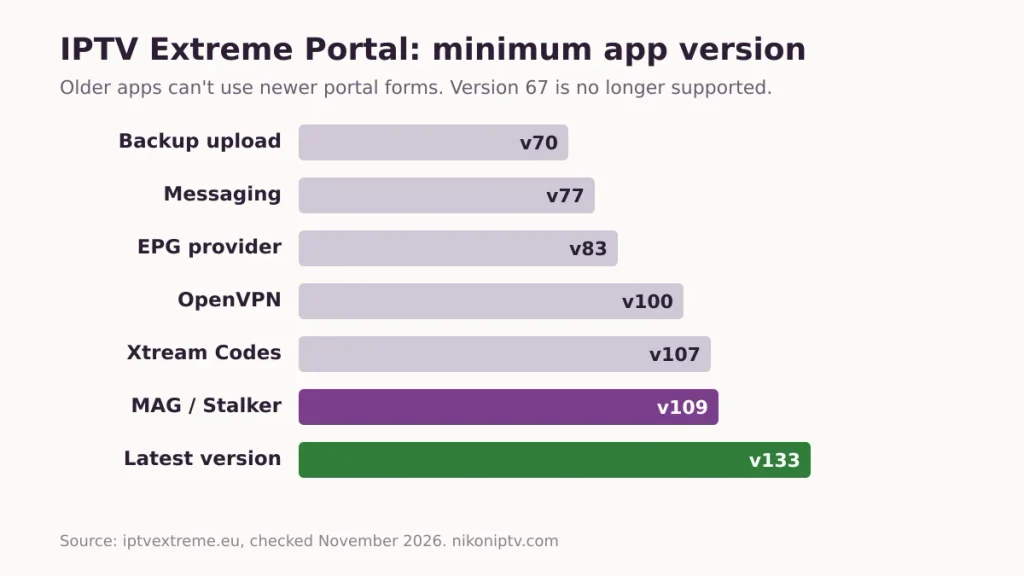
| Xtream Codes | Server URL, username and password | MAC Address; Playlist Name; Server URL; Username; Password | 107 |
| MAG / Stalker | A portal URL and a MAG-style MAC | MAC Address; Playlist Name; MAG Portal URL; MAG MAC Address | 109 |
Source: IPTV Extreme Portal, verified November 2026. The portal also says version 67 is no longer supported and asks users to update to version 133. Other portal features need at least version 70 (backup upload), 77 (messaging), 83 (EPG provider) or 100 (OpenVPN).
Steps:
- Open iptvextreme.eu in a phone or computer browser.
- Choose the form that fits your login type.
- Enter the MAC address from the app.
- Add your playlist details and press the save button.
- Restart IPTV Extreme and wait up to a minute for the channels to load.
New to playlist links? Our guide to the M3U playlist explains what the link is and where it comes from.
The two MAC addresses most guides miss
Most guides talk about “the MAC address” as if there is only one. With a MAG/Stalker login, IPTV Extreme asks for two different MAC addresses in the same form.
| App MAC (MAC Address) | MAG MAC Address | |
|---|---|---|
| What it does | Links the portal to your IPTV Extreme app | Identifies your “box” to the provider’s portal |
| Where you get it | The MAC: field under IPTV EXTREME PORTAL in the app | The MAC your provider activated for you |
| Typical start | Any value the app shows | 00:1A:79 for MAG-style logins |
| Who checks it | The IPTV Extreme Portal | Your IPTV provider’s server |
Source: IPTV Extreme Portal MAG/Stalker form; Nikon IPTV setup guide, verified November 2026.
Why this matters: if you type the app MAC where the MAG MAC should go, the provider’s server sees a MAC it never activated. The portal then treats your login as not activated.
Why do MAG MAC addresses start with 00:1A:79?
The first half of a MAC address shows who registered that block. The 00:1A:79 prefix is registered to Telecomunication Technologies Ltd. in Odessa, Ukraine, according to IEEE registration data shown by MAC Lookup. MAG boxes and MAG-style logins use that prefix.
One prefix covers a lot of boxes. The last three pairs give 2^24 combinations, which is 16,777,216 possible addresses for one prefix.
Why the IPTV Extreme MAC differs from your device MAC
The MAC in IPTV Extreme is different from the MAC in your TV settings because Android does not let apps read the real one. Since Android 6.0, Android’s own developer notes say that the Wi-Fi and Bluetooth MAC methods return a fixed value of 02:00:00:00:00:00 to apps.
So an app that needs a unique ID has to create its own. That is why:
- The MAC in IPTV Extreme does not match Settings → Network on your TV.
- Two apps on the same TV can show two different MACs.
- You should always copy the MAC from the app itself, not from your TV’s network menu.
What are IPTV portals?
IPTV portals are server addresses that a set-top box or app logs into to get channels, the guide and video on demand. The box sends its MAC address. The portal then checks whether that MAC has an active account.
Most IPTV portals of this type run on Ministra, formerly known as Stalker Middleware. That is why apps call it a “MAG portal” or “Stalker portal.”
| Login type | What you get from the provider | How the server knows you |
|---|---|---|
| M3U playlist | One playlist link | The link itself |
| Xtream Codes | Server URL, username and password | Username and password |
| MAG / Stalker portal | Portal URL | Your MAC address |
Source: IPTV Extreme Portal forms, verified November 2026.
Nikon IPTV’s own setup guide uses the portal method for MAG boxes. You send the box’s MAC (starting 00:1a:79), then enter the portal URL from your activation email.
SS IPTV MAC address: does SS IPTV use one?
No. People often search for an SS IPTV MAC address, but SS IPTV does not ask for a MAC address to add an external playlist. Its official playlist editor page uses a connection code instead.
- Open SS IPTV settings on your TV and generate a connection code.
- Enter that code on the SS IPTV playlist page.
- Upload or link your playlist.
The page says the editor keeps the connection with your device until you disconnect it. So you don’t need a new code each time you change your playlist.
How to fix “Your STB is blocked. Call the provider”
“Your STB is blocked, call the provider” comes from your provider’s portal, not from your box or app. Infomir, the maker of MAG boxes, says in its support FAQ that it most often appears when the subscription has expired or the account is not activated on the provider’s portal.
Work through this checklist:
- Check your subscription date. Renew if it has ended.
- Check the MAC on file. It must match the MAC your box or app sends. Nikon IPTV’s FAQ notes this error happens when the MAC doesn’t match the one on the system.
- Check which MAC you entered in IPTV Extreme. The MAG MAC Address field must hold the activated 00:1A:79 MAC, not the app MAC.
- Check the portal URL. Copy it exactly from your activation email.
- Restart the box or app. Then try again.
- Contact your provider with your MAC address if none of the above helps.
Getting a different login error in another app? Our guide to the IPTV Smarters “failed to authorize” error covers the most common fixes for username and password logins.
The honest limits of MAC-based IPTV logins
MAC-based logins are simple once they work, but they have a few real limits.
What they do well
- No username or password to type on a TV remote.
- The IPTV Extreme Portal lets you add playlists from a phone or computer.
- The portal offers a protection password and link lock to hide your playlist link.
Where they fall short
- One typo breaks it. A single wrong character means “not activated.” Fix: copy the MAC straight from the app screen.
- A new device means a new app MAC. The ID belongs to the app on that device. Fix: read the MAC on the new device and update the portal.
- Two MAC fields confuse people. Fix: app MAC goes in “MAC Address” and the activated 00:1A:79 MAC goes in “MAG MAC Address.”
- Older app versions lose features. Xtream needs version 107 and MAG needs version 109. Fix: update the app.
None of these are deal-breakers. Once the MAC is right, the login usually keeps working until you change devices.
Frequently Asked Questions
How do I find the MAC address on IPTV?
In IPTV Extreme, tap Add playlist and choose IPTV EXTREME PORTAL. Then read the MAC: field. On a MAG box, the MAC is on the label underneath the box and starts with 00:1A:79.
Is the IPTV Extreme MAC the same as my TV’s MAC?
No. Android has returned a fixed placeholder (02:00:00:00:00:00) to apps since Android 6.0. So IPTV Extreme creates its own ID, which will not match your TV’s network settings.
What is a server address for IPTV?
It is the URL your app or box logs into to get channels. Xtream Codes logins call it the Server URL. MAG-style logins call it the Portal URL.
What is the IPTV Extreme Pro MAC address?
It works the same as in the free app. In IPTV Extreme Pro, open Add playlist, choose IPTV EXTREME PORTAL and read the MAC: field.
Does SS IPTV use a MAC address?
No. SS IPTV links external playlists with a connection code generated in the app’s settings. You enter that code on the SS IPTV playlist page.
Why does my IPTV provider ask for my MAC address?
Portal-style services identify your device by its MAC address instead of a username. The provider activates that MAC on its server, so only your device can log in.
How do I change the MAC address on my IPTV account?
Ask your provider to replace the old MAC with the new one on their server. If you moved IPTV Extreme to a new device, also enter the new app MAC on the IPTV Extreme Portal.
Final thoughts on the IPTV Extreme MAC address
The IPTV Extreme MAC address lives under Add playlist → IPTV EXTREME PORTAL. It is the app’s own ID, not your TV’s hardware MAC. For MAG-style logins, keep the two fields straight: the app MAC in “MAC Address” and your activated 00:1A:79 MAC in “MAG MAC Address.”
Want to see which channels your playlist should include? Our IPTV channel list gives you a US checklist to test after setup.
Which app do you use with a MAC address login? Tell us in the comments.
