Two TVs, a phone and a tablet all want live TV at the same time. Will one IPTV login cover them? This guide explains how IPTV multiple connections work, how many you really need and how much internet speed 2 to 5 connections use.
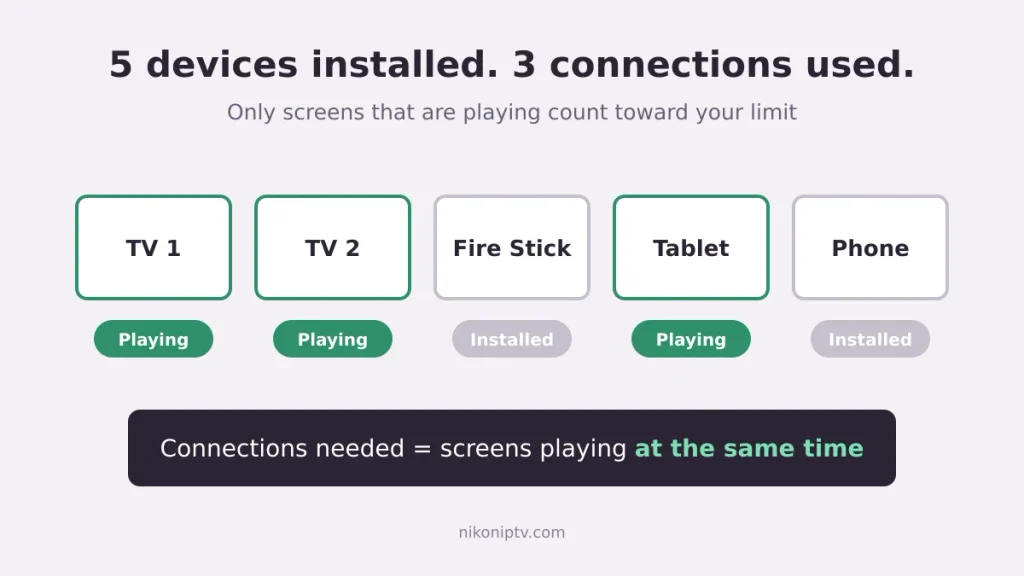
IPTV multiple connections means how many devices can stream at the same time on one subscription. You can install the app on many devices, but only as many can play at once as you have connections. Each connection is one live stream that needs about 5 Mbps in HD or 15 Mbps in 4K.
Key Takeaways
- A connection is one active stream, not one installed device.
- Big licensed US services set limits too: YouTube TV allows 3 streams and Sling Orange allows 1.
- Five HD connections need about 25 Mbps. Five 4K connections need about 75 Mbps.
- Most services expect all connections to be used in one household.
What are IPTV multiple connections?
IPTV multiple connections are the number of streams your subscription can play at the same moment. One connection equals one screen playing live TV or video on demand.
The key word is “at the same time.” You can install your IPTV app on a TV, a Fire Stick and a phone. With a one-connection plan, only one of them can play at a time. Start a second one and the first usually stops or shows an error.
Think of connections like seats at a table. You can invite as many devices as you like, but only as many can sit and eat at once as there are seats.
Nikon IPTV’s own FAQ works the same way: one subscription covers one device. You add connections to watch on more.
IPTV multi connection basics: connections vs devices
A connection counts only while something is playing. Installed apps, logged-in devices and paused screens with the stream closed do not use one.
| Situation | Uses a connection? |
|---|---|
| App installed but closed | No |
| Logged in, sitting on the home menu | Usually no |
| Watching a live channel | Yes |
| Watching a movie from video on demand | Yes |
| Two apps playing on the same device | Usually yes, one each |
| Recording to a cloud DVR in the background | Depends on the service |
Source: Nikon IPTV editorial summary based on how licensed services describe stream limits; YouTube TV Help notes that a computer and a phone watching at once count as two of its three devices, verified November 2026.
On MAG boxes and other MAC-based logins, each box has its own MAC address. Nikon IPTV’s FAQ notes that using the same MAC on several devices gets that MAC blocked. So each box needs its own connection.
How many streams big US live TV services allow
Even licensed US live TV services limit how many screens can play at once. Their rules are a useful benchmark when you compare any IPTV with multiple connections.
| Service | Streams at once (standard) | More screens option | Away from home |
|---|---|---|---|
| YouTube TV | 3 | 4K Plus add-on: unlimited at home | 3 total |
| Hulu + Live TV | 2 | Unlimited Screens add-on: unlimited at home | 3 with the add-on |
| Sling Orange | 1 | Orange + Blue: 4 total | Same limit |
| Sling Blue | 3 | Orange + Blue: 4 total | Same limit |
| Fubo (plans with Unlimited Screens) | 10 at home | Included in those plans | 3 |
| DIRECTV (streaming) | Unlimited at home | Included | 3 |
Source: YouTube TV Help and home network page; Hulu; Sling Help; Fubo Support; DIRECTV, verified November 2026.
What the table shows
- Three is a common standard limit. YouTube TV and Sling Blue both stop at 3.
- “Unlimited” almost always means “at home.” Away from home, YouTube TV, Hulu (with its add-on), Fubo and DIRECTV all cap you at 3.
- Sling Orange is the strictest. Sling says its Orange-only channels play on one device at a time, even if you also have Sling Blue.
How many IPTV connections do you need?
Count the screens that play at the same time on your busiest evening, not the number of devices you own. That number is the connection count you need.
| Your household | Typical busy-evening screens | Connections to look for |
|---|---|---|
| One person, one TV | 1 | 1 |
| Couple with a TV and a phone | 2 | 2 |
| Family with 2 TVs and a tablet | 3 | 3 |
| Large family with 4 TVs | 4 | 4 |
| Big home or shared sports nights | 5 | 5 or more |
Source: Nikon IPTV worked examples, November 2026.
Quick test: on your next busy evening, count how many screens are playing at 8 p.m. Add one if family members often watch on phones at the same time.
Internet speed for IPTV with 5 connections (and 2 to 4)
Each connection is its own stream, so the speed you need adds up. Netflix recommends 5 Mbps for HD and 15 Mbps for 4K per stream. We used those numbers to work out the totals.
| Connections | All in HD (5 Mbps each) | All in 4K (15 Mbps each) | HD data per hour |
|---|---|---|---|
| 1 | 5 Mbps | 15 Mbps | 2.25 GB |
| 2 | 10 Mbps | 30 Mbps | 4.5 GB |
| 3 | 15 Mbps | 45 Mbps | 6.75 GB |
| 4 | 20 Mbps | 60 Mbps | 9 GB |
| 5 | 25 Mbps | 75 Mbps | 11.25 GB |
Source: Netflix-recommended internet speeds, verified November 2026. Totals: connections × Mbps per stream. Data per hour: Mbps × 3,600 seconds ÷ 8 ÷ 1,000. Example: 25 × 3,600 ÷ 8 ÷ 1,000 = 11.25 GB.
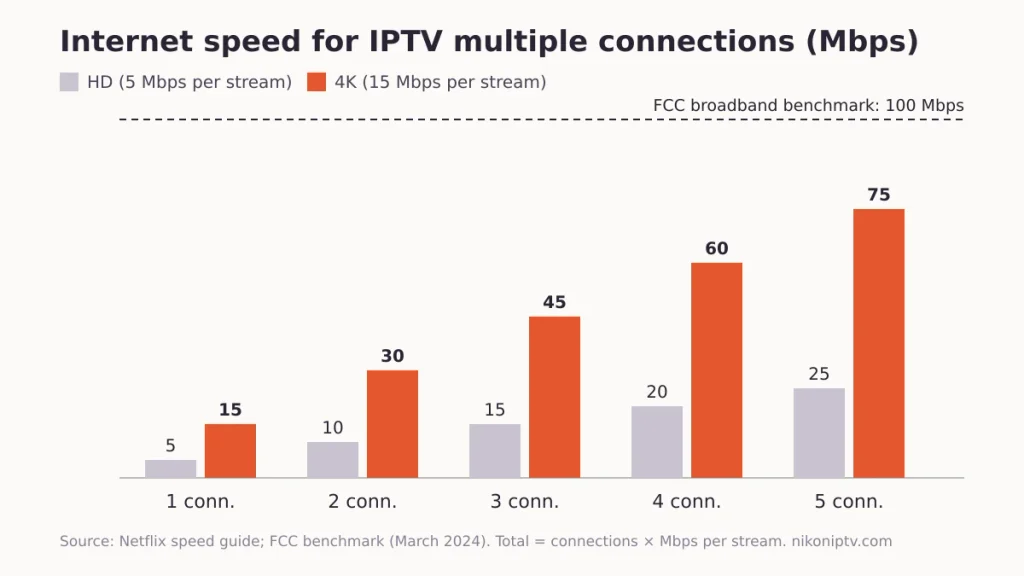
What it means for an IPTV plan with 5 connections: five 4K streams need about 75 Mbps. That fits under the FCC’s broadband benchmark of 100 Mbps download, which the FCC adopted in March 2024, according to Broadband Breakfast. But it leaves only about 25 Mbps for everything else in the home.
Tips for smooth streaming on several screens:
- Connect the main TV by Ethernet cable if you can.
- Keep other heavy downloads off during big live events.
- Drop one or two screens to HD when everyone is watching at once.
Can you use IPTV connections in two homes?
Usually not. Most services expect all connections to be used in one household. Licensed services enforce this. Many IPTV providers follow the same idea.
- YouTube TV: family group members must live in the same household as the family manager, per its family group help page.
- Fubo: says using Fubo on TV devices in two locations at once triggers a “too many locations” error.
- Home network rules: YouTube TV, Hulu, Fubo and DIRECTV give their higher stream limits only on your home network.
If you need TV in a second home, check your provider’s rules first. A separate subscription for the second address is often the cleanest answer.
How to set up IPTV on several devices
Setting up multiple connections takes a few minutes per device. You use the same login details on each one, unless you use MAC-based boxes.
- Check your connection count in your account or welcome email.
- Install the same app (or any supported app) on each device.
- Enter the same login: M3U link or Xtream Codes server URL, username and password.
- For MAG boxes, send each box’s MAC address to your provider so every box is activated.
- Test all screens at once. Play a channel on every device together to confirm the count works.
Device-specific help: see our guides to IPTV on Firestick and watching IPTV on mobile.
The honest limits of IPTV multiple connections
More connections make life easier for busy homes, but they come with real costs.
What multiple connections do well
- Everyone watches what they want at the same time.
- One account and one bill for the whole household.
- No need to log in and out between devices.
Where they fall short
- More connections cost more. Each extra stream adds to the price on licensed services too, such as Hulu’s Unlimited Screens add-on. Fix: count your real busy-evening screens before you upgrade.
- Speed adds up. Five 4K streams use about 75 Mbps. Fix: use HD on smaller screens and Ethernet on the main TV.
- One-home rules. Most services expect one household. Fix: check the rules before using a connection at another address.
- Going over the limit stops a stream. The extra device gets an error. Fix: close the app on devices nobody is watching.
None of these are deal-breakers. If your household rarely watches on more than two screens at once, a 2-connection plan is usually enough.
Frequently Asked Questions
Can I use one IPTV subscription on multiple devices?
Yes, you can install it on many devices. But only as many devices can play at the same time as your plan has connections. A one-connection plan plays on one screen at a time.
What does “connection” mean in IPTV?
A connection is one active stream. If your plan has 3 connections, three screens can watch at the same moment.
How many connections do I need for IPTV?
Count the screens that play at the same time on your busiest evening. Most couples need 2, families with two TVs and a tablet need 3 and large households may need 4 or 5.
What internet speed do I need for 5 IPTV connections?
About 25 Mbps for five HD streams and about 75 Mbps for five 4K streams, based on Netflix’s per-stream recommendations. Leave extra room for other devices at home.
Can I use IPTV connections in different houses?
Usually not. Most services expect all connections in one household. Licensed services such as YouTube TV and Fubo enforce this with home location checks.
Is multi-view the same as multiple connections?
No. Multi-view shows several channels on one screen. Multiple connections let separate devices watch at the same time.
What happens if I go over my connection limit?
The extra device usually gets an error or stops playing. Close the stream on another device to free a connection.
Final thoughts on IPTV multiple connections
IPTV multiple connections are simple once you count streams, not devices. Match the number to your busiest evening and check your internet speed for that many streams: about 5 Mbps each in HD and 15 Mbps in 4K. Keep all connections in one household.
Choosing a service? Our guide to the IPTV subscription covers what else to check.
How many screens play at once in your home on a busy night? Tell us in the comments.
