Stremio is great for movies and shows. But can it play the live channels from your IPTV subscription? Yes, through an addon. This guide compares five IPTV Stremio addons that load your own playlist and walks you through the setup step by step.
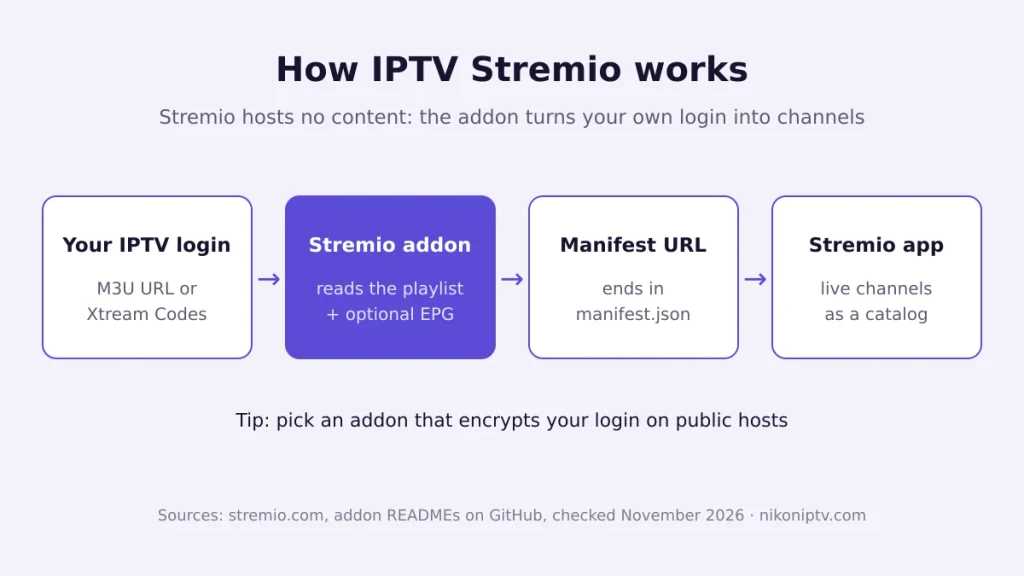
IPTV Stremio means watching your IPTV subscription inside the Stremio app. Stremio has no built-in IPTV player and hosts no content. A community addon such as M3U/EPG TV Addon, NexoTV or YourIPTV reads your M3U playlist or Xtream Codes login. Your live channels then show up as a catalog in Stremio.
Stremio hosts no content. The addon turns your own login into a channel catalog.
Key Takeaways
Stremio says it provides no content itself. Every IPTV channel comes from an addon you add.
All five addons in this guide say the same thing: you bring your own M3U or Xtream Codes login.
Four of the five have a free public instance. One is self-hosted only.
Your login is stored inside the addon URL, so pick an addon that encrypts it on public hosts.
Can you watch IPTV on Stremio?
Yes. You can watch IPTV on Stremio by adding a Stremio IPTV addon that reads your playlist. Stremio itself does not open M3U files the way a dedicated IPTV player does.
Stremio calls itself a modern media center. Its official site says it provides no content of its own. Content comes from addons. TV channels are one of the content types it lists.
An IPTV Stremio addon is a small web service. You give it your M3U playlist link or your Xtream Codes details. It turns them into a channel catalog that Stremio can show.
The 5 best Stremio IPTV addons compared
We checked the official pages of five bring-your-own-playlist IPTV Stremio addons. Here is what each one lists.
None of them sell channels. The M3U/EPG TV Addon README says the project does not provide IPTV content. NexoTV says it does not provide, host or distribute any content.
Xtream Codes support is standard. All five accept an Xtream Codes login or an M3U link.
The TV guide differs. Four addons list a TV guide. IPTV Catchup also adds catch-up TV. StreamVault does not list one.
Free public hosts have limits. ElfHosted describes the public YourIPTV instance as rate-limited with smaller timeout windows.
Who should pick which: Want the most settings? Try the M3U/EPG TV Addon. Want the quickest setup? NexoTV has a public instance and a source check on its configure page. Have a big movie and series library on Xtream? Look at YourIPTV.
How to set up an IPTV Stremio addon in 6 steps
The steps are the same for every IPTV Stremio addon. Only the configure page looks different.
Get your login details. You need an M3U URL or Xtream Codes details: server URL, username and password. Your provider usually sends them by email.
Install Stremio. Get it from stremio.com or your device’s app store. The basic plan is free.
Open the addon’s configure page. Use its public instance or your own server. Pick Direct M3U or Xtream Codes mode.
Paste your details. Add an XMLTV guide URL if you want a TV guide. Our guide to what EPG is explains where that link comes from. Let the addon run its checks.
Install the addon. Click Install. If Stremio does not open, copy the manifest URL. In Stremio go to Addons, click + Add addon, paste the URL ending in manifest.json and confirm.
Open your channels. Your live channels appear as a new catalog in Stremio. Start with one channel to test playback.
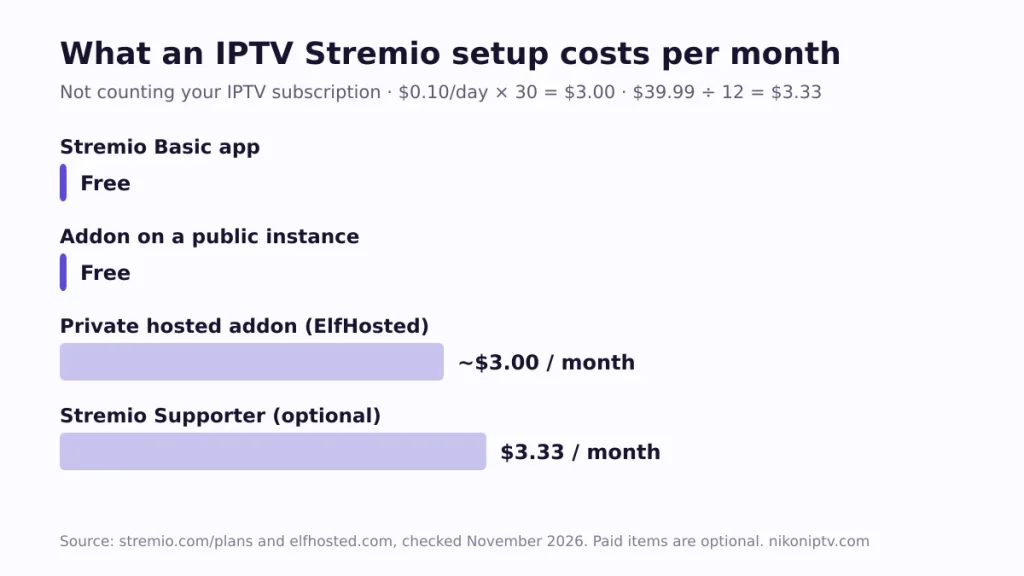
Worked example: A private hosted addon at $0.10 a day costs about $3 for a 30-day month (0.10 × 30). Over a year that is about $36.50 (0.10 × 365). Stremio’s Supporter plan works out to about $3.33 a month ($39.99 ÷ 12). Neither one is needed to watch IPTV.
The Stremio app and public addons are free. Private hosting and the Supporter plan are optional.
Stremio IPTV addon vs a dedicated IPTV player
Stremio wins when you want movies and live TV in one app. A dedicated IPTV player wins when live TV is your main use.
Pick Stremio if you already use it and want your channels next to your library. It runs on computers, Android and Android TV. Stremio Web covers iPhone and iPad.
Pick a dedicated player if you want a full TV guide grid and channel surfing. Our TiviMate on Firestick guide shows one popular option.
Most problems come from the addon URL. Here are the usual ones and their fixes.
“Failed to get addon manifest” or a loading error. Check the URL. Copy it and paste it by hand with + Add addon instead of the Install button.
The addon will not load in Stremio Web. The Stremio addon SDK docs say a URL must support HTTPS unless it runs on 127.0.0.1.
You changed a setting and nothing happened. Settings live on the addon’s own page. Reinstall it with the new manifest URL it gives you.
Your provider changed its server. Open the configure page again, enter the new details and reinstall.
A live channel will not play. Some addons need an outside player for live TV. StreamVault says VLC is required.
The honest limits of IPTV Stremio setups
An IPTV Stremio setup works well, but it is a workaround. Know these limits before you rely on it.
What it does well
One app for your movie library and your live channels.
Free app and free addons.
Works with the M3U or Xtream Codes login you already have.
Where it falls short
Community addons, not official ones. Stremio does not build these IPTV addons. Fix: use addons with public source code and a clear README.
Your login sits inside the addon URL. The M3U/EPG TV Addon README recommends encrypted tokens on shared public hosts. Fix: choose encryption or host the addon yourself.
Public hosts can be slow or go offline. Free instances are shared. Fix: save your manifest URL so you can reinstall it fast. Big playlists may need a private host.
Limited on Apple devices. Stremio suggests Stremio Web for iOS and iPadOS and says it is more limited. Fix: use a computer or an Android TV device for the full app.
Screens add up. Each device you add uses your IPTV login. Most providers limit how many streams run at once. Our guide to IPTV multiple connections explains how to count them.
None of these are deal-breakers for most people. If live TV is all you watch, a dedicated player may simply suit you better.
Frequently Asked Questions
Can you watch IPTV on Stremio?
Yes. Add a Stremio IPTV addon such as M3U/EPG TV Addon, NexoTV or YourIPTV. Enter your M3U link or Xtream Codes login and your channels appear in Stremio.
What is the best IPTV addon for Stremio?
It depends on your needs. M3U/EPG TV Addon has the most settings. NexoTV is quick to set up. YourIPTV handles large Xtream movie and series libraries.
Can I get live channels on Stremio?
Yes. Stremio lists TV channels among its content types. Live channels come from an addon. An IPTV addon shows the channels from your own subscription.
What channels are available on Stremio?
Stremio has no channel list of its own because it hosts no content. With an IPTV Stremio addon you see the channels in your provider’s playlist.
Is Stremio free to use?
Yes. The Basic plan is free. Stremio also sells an optional Supporter plan at $39.99 a year and a Lifetime plan at $199.99 with extra features.
Is IPTV legal to use?
IPTV is a legal technology. What matters is whether your provider has the rights to the channels. Our guide to legal IPTV services shows what to look for.
Do I need a VPN for IPTV on Stremio?
Stremio and these addons do not require one. A VPN is a privacy choice. It does not change whether a stream is licensed.
Final thoughts on IPTV Stremio
IPTV Stremio setups let you keep live channels and your movie library in one app. Pick an addon that encrypts your login. Save the manifest URL. Test one channel before you set up every screen.
Which Stremio IPTV addon do you use and why? Tell us in the comments.
James Walker is a global streaming consultant and IPTV reviewer with over 15 years of industry experience. He has advised OTT platforms, broadcasters, and IPTV providers on content delivery, monetization strategies, and user experience optimization. His deep understanding of streaming infrastructure allows him to evaluate services beyond surface-level marketing claims. James focuses on real metrics such as buffering rates, server reliability, and multi-device performance. Through his writing, he aims to bridge the gap between technical performance and user expectations—offering readers clear, trustworthy insights into the best streaming solutions available today.